Tuesday, January 22, 2013

Comparison of Linux Distributions


Desktop Linux is a thriving ecosystem, and this is also its downfall. Fragmentation has split the already drifting community into cultist tribes that claim their distribution to be king. This is a comparison of what the main Linux distributions offer over one another. There are more than I write about in this article, but it is only fair to right about what I have used for more than a day.


Ubuntu
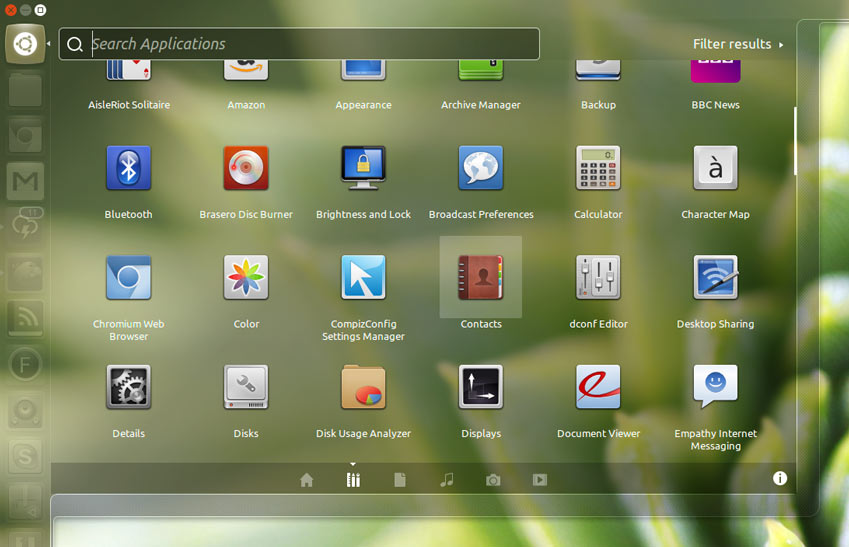
http://www.omgubuntu.co.uk/wp-content/uploads/2012/10/farnza.jpgUbuntu is the third result in a google search for "Linux". It is usually the first stop in a young Linux User's journey for good reason. Tools like automatic update reminders, a very intuitive user interface (with an OS Xish feel) will be comfortable to use for a user migrating from another Operating System. For beginners there is no doubt in my mind. Ubuntu is king for integration and user experience. But for getting real work done after you're comfortable with Linux? Maybe not so much.

Ubuntu's Ubuntu One daemon and other applications like it tend to eat more RAM than a distribution without Ubuntu's "bloat". A variant such as Xubuntu would be better for seriously using Ubuntu on a production machine. The Ubuntu base is nice for those looking to get work done though, mainly because of the PPA system. PPA's are basically remote repositories you can subscribe to with add-apt-repository and pull packages from.


 Linux Mint

 Linux Mint takes Ubuntu and makes it sane again for normal desktop users. Unity is innovative, but it's definitely not for everybody; especially if the idea of how a desktop works (start menu, desktop shortcuts, etc) is well ingrained in your mind. Linux Mint maintains two desktop version, one with the lightweight Gnome 2 fork MATE and the other with Cinnamon, a fork of Gnome-shell. I haven't given Cinnamon the reviews it deserves. It's truly a great desktop environment, especially since the menu that launches applications and searches locations has improved in terms of relevance and speed.

Beginning users will find Linux Mint comfortable as it comes with tools that were designed to make Ubuntu, one of the easiest distros, even easier. Their update manager rates updates based on importance so you can delay serious updates until you're ready for them. Linux Mint is also compatible with Ubuntu's PPA system if you're using their Ubuntu edition, but Linux Mint: Debian Edition is not. Keep in mind that Linux Mint: Debian Edition is basically Debian with the Linux Mint tools on it, so later in this article when Debian is talked about think back to Linux Mint: Debian Edition.
                                                                                  
http://upload.wikimedia.org/wikipedia/commons/d/da/Debian_Desktop.pngDebian
Debian is a very popular Linux Operating System, but not necessarily for its use on Desktops. Some users find Debian Testing to be comfortable for desktop use, but even then packages and support tend to lack behind upstream. The main appeal of Debian is rather its viability in servers, as versions are supported for quite a long time and packages are vigorously tested for problems that could reduce uptime or performance by even a bit. One statistic read that 32% of all the world's servers used Debian. If you're deadset on using Debian, then Crunchbang, a Debian derivitive of Testing (like Ubuntu) that comes with the Openbox window manager and a dark theme may be for you. Crunchbang is so similar to Debian that it is not worth its own section, but it has a unique and active forum / irc community apart from Debian's.

Fedora
Fedora is the "testing" version of Red Hat Enterprise Linux, which is another huge competitor in the server market. Unlike its parent (daughter?) operating system Fedora is primarily used on the desktop. With the Gnome Shell and no modifications to upstream applications you will find there to be familiarity with Fedora and other distributions. Fedora offers an intuitive installer and the yum package management system, with a third party repository so large that it rivals the AUR. Arch and the AUR is mentioned next.

Arch Linux
Arch Linux is a distribution for advanced Linux users that basically want to configure their system from the ground up. The installation is very minimal (text only), and then the user can choose which packages to install to custom tailor their installation of Arch Linux. The selling point to Arch is that it's rolling release, so a user never has to reinstall (until they bork something), the package management (the largest repositories in existence exist for Arch and its fork, Manjaro.), and the KISS principles that another distribution, Chakra, follows even more closely. Chakra is like a preconfigured Arch Linux with KDE that only allows the installation of Qt packages with the option for certain bundles that allow GTK applications. By the way, there's no installer. Just some scripts and pacstrap.

Gentoo Linux
Gentoo is BY FAR the hardest distribution to install. Gentoo is basically Arch taken to a whole new level of minimalism. Gentoo must be compiled fully to be installed. There is no installer and no tools by the (wonderful) wiki to guide the user. This is not for Linux Experts, it's for the type of people with BSD toasters and a HUD in their bathroom mirror. Although it does provide a lot of flexibility and good source package management with USE flags, to truly reduce bloat. A fork of Gentoo, Sabayon, makes the installation far easier with Fedora's Anaconda and adds binary package management. No more wasted weeks spent compiling Libreoffice.

Conclusion
I find myself most comfortable using Ubuntu on desktop systems, Fedora on Laptops, and Debian on any servers. Arch and Gentoo are specialist distributions and should be used as such.
 

Thursday, January 17, 2013

Fedora 18 Video and Text Review

This week Fedora 18 went stable (and actually trimmed a good 3.2 GiB off of the beta .iso, topping in at 942 MiB, which is easily burnable to a DVD disk or most bootable USB drives. Now, Fedora is a pretty low-key operating system when compared with, say, Ubuntu, so it didn't cause the large-scale celebrations you'd expect to see from a major release. Trust me when I say that by the end of the review you will know just how major of a release Fedora 18 is.

A bit about Fedora
In case you aren't already in the loop, Fedora is Linux operating system based on Red Hat Enterprise Linux. Changes are made to Fedora before they're made to Red Hat to make sure no breakages will occur, since Red Hat is mostly a server Operating System. This means that Fedora can (and has/is) experiencing breakages due to the youth of code that appears in its base. It's bleeding edge and rolling release. Install once and done, then you have access to all of the latest upstream packages. Think: A user-friendly .rpm version of Arch Linux. If you want a stable .rpm distro like RHEL, look to CentOS. Don't get it wrong; Fedora is extremely secure (thanks to Suse's Selinux), but it's just not as stable as its mother distribution.

The code and sponsoring that Fedora inherits from Red Hat give it an edge. It's one of the few Linux distributions backed by a large company (one with higher stock prices than Microsoft, even), which gives it a definite edge over its competition. Even with this backing, it doesn't go closed-garden (ala Canonical's approach) and still has a positive sense of community among the developers.

The Review
--Huge Improvement
Fedora 17 was an incremental increase over Fedora 16. Very little was improved, and it felt like all that had been done was some user experience fixing and the package freeze. Fedora 17 doesn't deserve to be in the same ballpark as Fedora 18. Fedora 18 was an enormous improvement, and an obvious display of effort from all parties involved (especially Gnome and the Fedora core development team). Here are some reasons why:

Gnome related
Paraphrasing Linus Torvalds, "Gnome 3 is a nightmare". If only he had tried Gnome 3.6.2 before that statement. It has animations (like Cinnamon) on by default, a working extension system, and features to maximize the screen space used by windows (like removing Window decorations on vertically maximized windows). It also has a new lock screen that tablet and touch users alike will find useful, and desktop and laptop users may find amusing. The buttons are even noticeably more aesthetically pleasing.

In actual usability, Gnome now supports dragging windows into the "expo" to move across workspaces, dragging icons into workspaces to deploy the application, and pretty much anything else you would ever want via extensions (http://www.extensions.gnome.org/). It's worth adding that the Gnome applications have added features, like EXIF data examination in pictures via Eye of Gnome, and a new virtual machine application called Gnome Boxes (a Qemu frontend).

Fedora Related
It would be unfair to talk about Fedora without mentioning the work that the Fedora developers have put into the operating system. The installer, Anaconda (which previously left a bit to be desired compared to Ubuntu) has had a visual and feature Facelift, supporting partial encryption and advanced partitioning. I was displeased with the layout of some of the buttons on the installer. You might have to hunt around for a button on the "root password" section (which, by the way, is in a weird optional part of the installer) in order to save your changes.

"Software" is now the graphical frontend to Yum, and it has had some added features like updating the status of the yum lock graphically, so when it's not working you now know why. I did have a problem with an omnipresent Yum lock that I had to remove after installation, but upon further research it seems that this and a GPG error both have patches nominated to fix them, so they're mostly irrelevant. Yum has a pretty CLI frontend too, with light curses displays and sane summarizations. Also, Yum now supports tab completion of packages.

Quick Facts
Firefox - 17
Gnome - 3.6.2
No Gimp
.iso is 942 MiB large
As of 1-17-12 the initial yum update is 270 MiB downloaded, 7 MiB disk space used on Gnome.

Video
 
Opinions
The best part of a review is the opinionated part. The part where feelings are scarred and lines drawn. Here are my opinions about Fedora 18 and Gnome 3.6.2.

The installer needs work, but it's much more user friendly (especially aesthetically) than it was beforehand.

The user experience is mind-blowing. Fedora is trying hard to cater to the end-user while not sacrificing any of the 4 essential freedoms, even where it would make life far easier.

Resources and Security are as good as always, and better with CPU cycles.

Gnome has surprisingly good defaults, and nice home-brewed applications.


Wednesday, January 16, 2013

Avoiding GPG Publickey errors installing packages in Fedora

Fedora 18 is a truly stunning Operating System, but it has such a large bug I was dumfounded to find that it was a real problem and not something that I had done to bork yum. .rpms cannot be validated, and thus cannot be installed. There is a simple solution to get around this.

Options
Use only yum's remote capabilities. This is an unattractive option since a lot of times software is not available in a repository (especially if it's hobbyist packaged).

Add the --nogpgcheck flag to yum, making the full command "sudo yum --nogpgcheck install package". This will disable checking altogether, which is what you want before the patch (which has already been submitted as of 1-16-12) is accepted and pushed.

About Recent Posts (blog related)
I'm sorry for the short "stubby" posts about Fedora tonight. I have had limited time to write this up, but I felt that it was critical. I got so fed up with it I nearly reinstalled Ubuntu. More workarounds to come.

Enabling flash in Fedora 18.

This is going to be a very terse post because of how critical it is. Flash is essential to the life of any computer user that is heavily media-centric, and not having it around could cause problems for Fedora's prolonged installation. Unfortunately, the clucks at Fedora thought that shipping a broken GPG checking system was acceptable, so this can be a lot harder than it has to be. These steps and commands will allow you to install Flash (and any other software) in Fedora 18.

The steps

su -c 'yum localinstall --nogpgcheck http://download1.rpmfusion.org/free/fedora/rpmfusion-free-release-18.noarch.rpm http://download1.rpmfusion.org/nonfree/fedora/rpmfusion-nonfree-release-18.noarch.rpm'
 
sudo yum install flash-plugin
 
This is by far the easiest way to 
go about the installation. What those
 two commands do is enabled a third-party
 repository named rpmfusion, and then install
 a package from there called flash-plugin that
 will integrate with Firefox.

Monday, January 7, 2013

Ubuntu Phone release date, info, and Speculation

After much recent community speculation over the identity of the Ubuntu mystery device, the Ubuntu phone was officially announced. This is the second mobile operating system Ubuntu has developed, the first being their plug-and-play Android application that gets an Ubuntu session running on a docked phone with an attached keyboard and monitor. The Ubuntu phone will be the completion of Unity's goal, to Unify the computing experience across all platforms. An Ubuntu phone can dock as a desktop operating system, double as a TV, and still be a phone when you want it, all while providing a familiar (and dare I say sleek) interface across every device.

Canonical works on software. That's it. They will not be the OEM for this device, but rather provide the software for vendors to brandish in their products (like what Google does with Android).

The Speculation Begins
1% of consumer desktop and laptop computers run Linux (Wikipedia statistics). Linux is gaining more users daily than any other Operating System family out there, and Ubuntu is the distribution that most people are flocking to. That said, it's still in the very back of the OS foodchain and you almost never hear about it in common society. It made a big splash in the Linux world, but I can't be the only one thinking that vendors could care less about it. Canonical is a large company, but not big enough to run advertisements for Ubuntu (or even OEM the hardware for the phone), so relying on a vendor is both risky and unlikely to work. I hope I'm wrong, though. People said the same thing about Android when it came out. The thing is, unlike Android the Ubuntu mobile OS does not break upstream compatibility. The community as a whole could benefit from its success in mobile.http://fc03.deviantart.net/fs71/f/2011/331/e/4/ubuntu_phone_explained_by_musl1m-d4hhe04.png

Developer Information
Like Firefox mobile OS the Ubuntu phone supports HTML5 web apps from the get-go, increasing the availability of popular web applications on the phone. In addition to that, you have access to a full arm Linux system with core utilities, meaning that you could make an app in any language that natively runs on Arm Linux. Imagine an app running Qt and Lisp on the Ubuntu phone; it would've never been considered possible.

A smart decision was to use QML for the UI, so developers that already have experience with Qt (Qt5 specifically) can hit the ground running with this phone. 


Saturday, December 29, 2012

Sabayon 10 Review - Why wanting 11 is a bad thing

I have long been a die-hard Sabayon Linux fan. I have used it for laptops, desktops, and servers in the past, but its use best fits user-centric computing: laptops and desktops. Sabayon is like Arch in that the packages are bleeding-edge. They follow upstream exactly, or at least within minor releases. This is thanks to Gentoo's Portage (source-based) and Sabayon's build server. When source code is pushed, Gentoo packages it and Sabayon makes it available as a binary. Theoretically this is a good thing. Before you can jump into this theoretical goodness you must first get Sabayon to work, and for 7, 8, and 9 this was no big deal; not the same story for 10.

If you look at my Bash's history, it won't be that grand. In fact, 11 commands might seem like a freakishly small amount. And why would package names like "kubuntu-desktop" appear on someone's history that praises Sabayon in their review? The answer is simple. Sabayon makes installing Gentoo extremely easy, but what it fails to do is adapt to slightly unusual partitioning schemes.

 My partitions are set up in such a way that packages are installed on a solid state drive, my hard drive gets its own /home, and a removable media is formatted with tmpfs. Sabayon was able to do this (with relative ease, I must say. Compared to something such as Crunchbang). Sabayon was even able to punch through the logical volume management on the disks, unlike some installers (I'm looking at you again, Crunchbang). The install worked and all was well, grub installed, my user was created, and the prompt to reboot came up. Upon reboot I was dropped into a shell (with a very pretty background image, I must say) prompting options. The "shell" command launched a limited shell, and I used it to dd /dev/sda with /dev/zero.

The second installation was the same story, even with just the hard drive being formatted to ext4 and used as the / partition.  At this point, I gave up and reinstalled lubuntu. A cut of losses.

Theoretical and past versions
Despite all of the trouble with Anaconda (Sabayon's installer) I will still always have a soft spot for Sabayon. The fact that such a small team is able to write something so big is astounding. They use a lot of Gentoo's work, but they add a LOT of their own stuff (including a package manager) and ship it upstream, benefiting the community. Entropy, the binary package manager, has features unlike that apt, yum, or zypper could ever dream of having without third party software.

With a few simple commands entropy can back up and export the entire database of installed packages, and have it reinstalled on another computer without even the hint of a depedancy problem. Even if you backed up Coreutils and did an equo restore over a newer version Entropy can adapt to not allow any problems to crop up.

Aside from the package manager itself, Sabayon features some stunning visuals and branding, including a custom TTY (which, by the way, stops kernel error logging unless explicitly specified. Perfect for those of us with a damaged USB port logging problem), nice default tools (as they say: "gcc is there, out of the box"), and your choice of desktop environment.

Sabayon has been described as "Gentoo for the lazy", and largely that's what it is. A platform for installing Gentoo and all of its benefits, with some added bonuses, like Entropy. The wiki is subpar compared to FreeBSD or Arch's, but it is there. It is a decently popular operating system, so there is also some community support. A big question is whether or not it will run Steam, and that answer is an astounding yes. Steam has been in the repositories since closed-garden beta.

Conclusion
Sabayon has a bright future. Low resources, a "kickin'" package manager, aesthetics, and a good core (Gentoo Linux) give it the edge over its competition. That said, there are still some bugs to iron out. I ran into a documented bug in the installer and wasn't even able to get it installed. If you like tinkering, or if you like Gentoo with an installer, Sabayon could possibly be the OS for you.

Sidenotes
Large .iso


Wednesday, December 26, 2012

Leapmotion on Linux: hitting the ground running

Leapmotion is an imaginary (in that it doesn't exist yet) but impending device that could possibly shape the future of interface. Since the creation of computers, wiring, CLI, GUI, and WIMP interfaces have all changed the way we defined our user experience. Look to any science fiction novel made after the 20th century, and you will find that the interfaces are floating masses of plasma, interacted with by the will of a user's fingertips in thin air. This technology is not far off, and its future looks especially promising for Linux compared to other commercial ventures.


A bit about Leapmotion
Leapmotion is a device that reads input from an infrared sensor about the environment around it. With an onboard CPU, it flushes out the noise and triangulates movement, with the precision of 5 milimeters. This processed movement data is send to the (proprietary) driver which executes commands from the input. Pretty nifty, especially for businesses where interaction with a computer would be a cumbersome job (think: Hazmat suits) and consumers that want a taste of the future.

Where Linux comes in
Linux has been the short end of the stick where third-party and commercial support are concerned. Canonical has changed that, especially over the past year (2012), and it's taboo to NOT have Linux support. The SDK is fully compatible with Linux, it will have supported kernel drivers, and it will also be used on embedded Linux devices (Android especially).

Gobs of Drama
 There has been an ongoing debate on LeapMotion's Linux page about whether or not to Open-source the driver. Advocates say that open source "supports itself" and "ensures that the technology won't end up in the landfill, but rather in the pantheon of human knowledge". However, senior members of the LeapMotion forums aren't nearly as understanding.

Some of the members advocating proprietary drivers refused to distinguish between gratis and libre for the sake of their argument, using childish retorts such as


 "all Linux users are so cheap they wouldn't give you a cup of coffee for a year's worth of software" -- FadingFast

"free open source" don't make much sense" -- flaredOne

and

"I guess it is because people can't "touch" software (hate that name there is nothing "soft" about it), and as such they believe even though people spend their lives creating this that they are some how entitled to have it for free and deny the creators of it any profit (not to mention a salary)."--FadingFast


These are not paid members of the LeapMotion development team. But according to some of the users in the forums, the team developing the Linux drivers is making it exceedingly difficult to develop FOSS drivers via reverse engineering, especially due to the "Wall of Silence" and mathematics involved in such reversing.

How the team feels about FOSS is a moot point. They are providing facilities for use on Linux before release, being generally very nice to the Linux community (they even have a subforum for Linux, how nice), and offering support for when a Linux user needs help. The way that the senior members took up arms is still inexcusable, however.